Increase revenue. Decrease expenses.
Know what's happening — in the field and the office.
TaskGenius is the field service platform for small construction and service teams — without spreadsheet chaos and without enterprise overkill.
What matters most to you?
Know what's happening — without the wrong tool.
Small field teams sit between two bad options. Spreadsheets and group texts mean nobody really knows what is going on — and that costs you in delays, rework, and lost billing. Enterprise field-service platforms mean paying for features you will never use and a rollout you do not have time for.
TaskGenius fits in the middle. Real operational structure. Communication tied to the work. Know what's happening in the field and the office — without the chaos and without the overhead.
Not enterprise overkill. Not a spreadsheet. Built for small teams that need to know what's happening and cannot afford either extreme.
Spreadsheet chaos
Group texts, sticky notes, memory billing — nobody has the full picture.
TaskGenius
Field capture + office visibility. One truth, two surfaces.
Enterprise overkill
Features you won't use and rollout you don't have time for.
Bill for everything that happened.
TaskGenius captures every hour, expense, and job detail in the field — so the invoice reflects what actually happened on the job.
Unrecorded hours and lost receipts are revenue you already earned but never billed. That is how TaskGenius increases revenue. Less time rebuilding invoices from memory is how it decreases expenses.
You do the work. Some of it never makes it to the invoice.
A plumber finishes a six-hour job, logs five. Travel time was never counted. The extra part went in without a receipt snap. The change order got agreed to verbally. By Friday, the timesheet is a best guess — and so is the invoice.
It is not carelessness. It is revenue left in the field — the gap between real-world job sites and tools that expect paperwork later.
- Hours logged from memory at the end of the day — revenue lost before the invoice is built
- Travel time disappears — billable labor never captured
- Receipts for materials and expenses go missing — costs you paid, never billed
- Change work done on site but never formally captured — revenue leakage
- Invoicing days after the job — details fade, you underbill
Even a few unrecorded hours a week add up. Over a year, that is real revenue left in the field — money you already earned but never billed.
Capture it when it happens. Invoice it the same day.
TaskGenius gives your crew a mobile app that works the way a job site works — not the way a spreadsheet expects it. Time starts when the truck moves. Expenses get captured with a photo. Notes and proof-of-work photos are tied to the job. By the time the crew wraps up, everything the invoice needs is already there. You know what happened — and you bill for it.
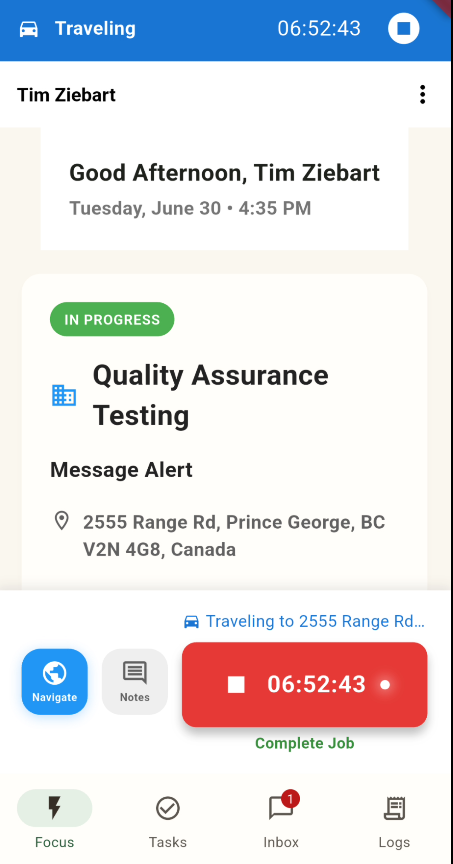
One tap to start the clock
Your tech taps Start Work. The timer runs. When they arrive on site, it switches from travel to labor automatically — no manual entry, no estimating drive time later.Revenue+ billable hours captured at the source.
Capture expenses while they happen
Snap a receipt photo on site. Add the category. Done. No receipts lost in a truck, no expense conversations at the end of the month.Revenue+ materials and costs make the invoice.
Document the work, not just the hours
GPS-stamped check-in, timestamped job photos, and field notes tie proof of work to every task. When a client questions the invoice, you have the record.Revenue+ disputes resolved with data, not concessions.
Invoice the same day the job wraps
Field time and expenses flow directly to the billable review queue. Review, adjust, build the draft invoice, and send the PDF — all from inside TaskGenius. No re-entering data.Expense- no admin hours rebuilding the invoice from scraps.
How TaskGenius increases revenue and decreases expenses.
| Feature | ROI | What it does for you |
|---|---|---|
| Smart timer with GPS handoff | Revenue+ | Captures travel and labor automatically — billable time that used to disappear |
| Mobile expense capture | Revenue+ | Receipts and costs captured on site — billed, not forgotten |
| GPS check-in and check-out | Revenue+ | GPS-backed timestamps when a client pushes back on the invoice |
| Job wrap-up flow | Revenue+ | Completion notes, issues, and photos before the crew leaves — nothing lost |
| Billable review queue | Revenue+ | Every unbilled hour and expense visible — approve, adjust, invoice |
| Invoice editor and PDF send | Revenue+Expense- | Invoice from captured data same day — no re-entry, no memory billing |
| Offline-first mobile app | Revenue+ | Capture in dead zones — revenue not lost because signal was weak |
| Task-linked inbox and email bridge | Revenue+ | Client and job communication tied to the work — context never lost in a group text |
When a client pushes back on the invoice, you already have the answer.
GPS-stamped arrival. Timestamped photos on site. Logged travel and labor time. A documented wrap-up. TaskGenius creates a record of what was done before the invoice ever goes out — so disputes get resolved with data, not arguments. That is revenue protection.
Built for contractors who do the work and run the business.
- Plumbers, electricians, HVAC technicians, and general contractors
- Owner-operators managing a small crew of 2–15 technicians
- Service businesses where every billable hour needs to hit the invoice
- Teams that have outgrown paper timesheets and group text updates
- Contractors tired of invoicing from memory a week after the job
Bill for everything that happened.
Increase revenue by capturing work at the source. Decrease expenses by cutting the admin hours spent rebuilding invoices from memory.
Deliver on time. Know what's happening.
TaskGenius gives project managers real-time visibility into crew activity, schedule, and project status — so delays surface early, not after the fact.
On-time delivery protects your margin. Early visibility cuts the cost of not knowing. That is how TaskGenius decreases expenses and protects revenue on every project.
You are accountable for delivery — but you cannot always see what is happening.
The crew is on site. The job is running. The only way to know where things stand is to call someone, wait for an update, or piece together timesheets at the end of the week. By the time a problem surfaces, the schedule has already slipped.
Managing field crews without knowing what's happening means managing by assumption — and that is where projects go late and over budget.
- Status updates through calls, texts, and verbal check-ins — not a reliable picture of what's happening
- Schedule slips discovered after they have already cost you a day
- Time against budget is a Friday calculation, not a live number — expense overruns caught too late
- Crew scheduling is reactive: conflicts cause delays before you see them
- Reporting to leadership requires assembling data that should already be in one place — admin expense
Know what's happening before it costs you a day.
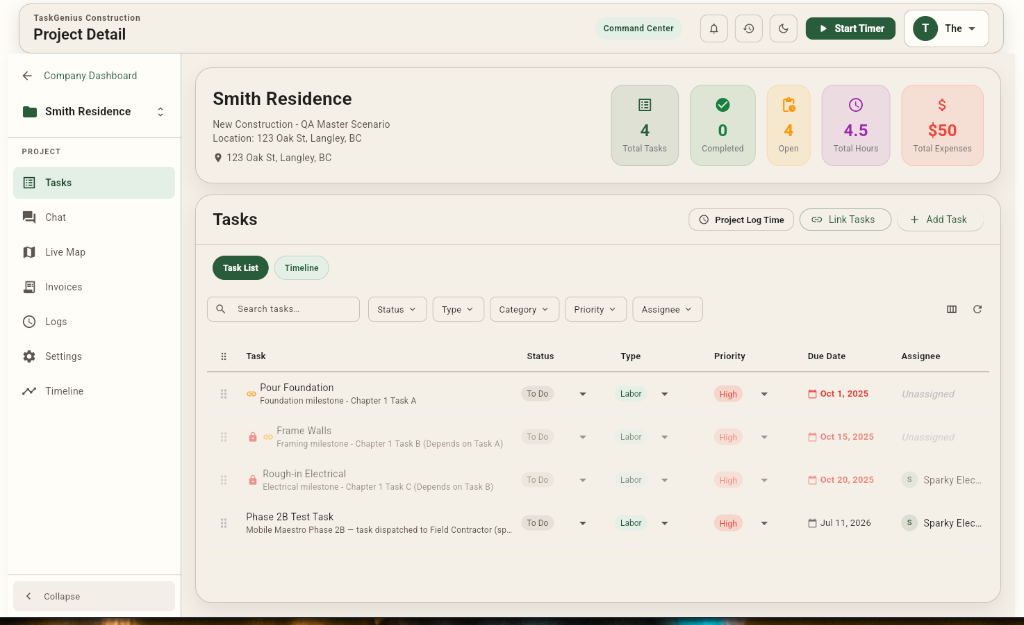
TaskGenius connects field capture to a web command center. Crew activity, task status, and logged hours appear as they happen. You see what is on track, what is blocked, and what is at risk — without chasing updates. Deliver on time because you know what's happening.
See the whole operation at a glance
The live command center shows team locations, active project status, and clocked-in crew — all in one view.Expense- your PM hours stop going to status calls and check-ins.
Track schedule against reality
Task assignments, due dates, dependencies, and sequences from the scheduling workbench. You see what is on track, blocked, or at risk — before it becomes a client conversation.Expense- delays caught early cost less to fix.
Know how time is being spent
Every crew hour logged in real time from the mobile app. Labor by task, project, and person — live, not assembled on Friday.Expense- overrun visibility before the budget conversation.
Keep crew accountable without micromanaging
GPS-verified check-in, timestamped photos, and task-linked notes — documented proof without standing over the crew.Expense- less rework from lost context.
Report up without rebuilding the data
Timesheet summaries, project status reports, and task lists from TaskGenius — not rebuilt manually.Expense- admin hours cut; leadership gets accurate data.
How TaskGenius helps you deliver on time and control costs.
| Feature | ROI | What it does for you |
|---|---|---|
| Live fleet and project map | Expense- | Know where the crew is — no call required to answer "what's happening?" |
| Activity feed | Expense- | Arrivals, status changes, photos, completions as they happen — delays surface early |
| Scheduling workbench | Expense- | See blocked and at-risk tasks before they slip the schedule |
| Task dependencies | Expense- | Sequencing holds — rework and delay costs reduced |
| Time review by project | Expense- | Labor hours live by task and person — catch overrun before week-end |
| Reporting hub | Expense- | Status and timesheet reports without manual assembly |
| Mobile GPS check-in | Expense- | Verified on-site activity — accountability without micromanaging |
| Task-linked communication | Expense- | Conversations tied to the task — no lost context, less rework |
| Email bridge and intake queue | Expense- | Forward project email into the system — triage without inbox chaos |
Know the answer before they ask the question.
Whether it is your site superintendent, your client, or your director asking where the project stands — TaskGenius means you have a real answer. Not a best guess from last Friday's timesheets. A live view of what happened, what is open, and what is next. That is how you deliver on time.
Built for PMs who need to deliver on time and know what's happening.
- Construction project managers at small to mid-size firms (5–50 field workers)
- Facilities and maintenance managers with multiple active sites
- Site supervisors accountable for schedule and crew performance
- PMs who need to report project status up to leadership or clients
- Managers who spend too much time chasing updates that should already be in a system
Deliver on time. Know what's happening.
Decrease expenses by cutting the cost of not knowing. Protect revenue by finishing on schedule and on scope.
One platform. Know what's happening — in the field and the office.
Capture time and tasks where the work happens.
- Focus dashboard for current and next work
- One-tap job start, stop, and travel timer
- Voice dictation task capture with checklists
- GPS check-in and proof-of-work photos
- Task-linked mobile inbox with offline SQLite
- 1099 Contractor privacy mode for subcontractors
Office sees field activity as it happens.
- Live command center for all active projects
- Universal AI Commander with staged mutation diffs
- Scheduling workbench and Gantt dependencies
- Billable review and client multi-project invoices
- Contractor rate masking and 1099 privacy controls
- Automated accounting sync (QuickBooks & Xero)
Universal AI Commander & MCP
Query your live workspace with natural language or voice dictation. Model Context Protocol (MCP) tools automate time logs, task creation, and scheduling with human-in-the-loop oversight.
Learn about AI Commander →Staged Mutation Diffs
Zero unsupervised writes. Every automated action and AI proposal generates an interactive before-and-after diff card so admins review and approve every change before commit.
Explore Safety Controls →Offline-First SQLite Engine
Cell dead zones shouldn't stop your crew. Mobile timers, photo uploads, and task checklists queue locally on SQLite and automatically reconcile in the background upon reconnection.
See Field Mobile Guide →1099 Contractor Privacy Shell
Dispatch subcontractors with complete peace of mind. Subcontractors see job locations, checklists, and instructions — while your client billing rates, markups, and margins stay private.
Review Privacy Architecture →The crew captures on mobile. The office sees it immediately. Same truth, two surfaces — so contractors bill accurately, project managers deliver on time, and margins are safeguarded.
Predictable pricing for growing field crews.
Protect your margins with clear per-seat tiers and fair infrastructure cost controls. No hidden fees or surprise billings.
Free
Permanent free account with essential tools.
- 1 Seat included
- Up to 25 jobs & 10 invoices / mo
- 5 AI Credits / mo (Trial bucket)
- 500 MB total org storage
- 90-day active data retention
- Offline Mobile App + SQLite Local DB
- Manual Export (CSV / PDF)
- Standard TaskGenius watermark
Solo
Individual contractors & sole proprietors
- 1 Seat (Single user)
- Unlimited jobs & invoicing
- 100 AI Credits / month
- 25 GB total org storage
- 1-year active data retention
- Offline Mobile App + Real-Time Sync
- QuickBooks Online & Xero Auto-Sync
- Custom invoice branding & logo
No credit card required. Defaults to Free if not upgraded.
Once registered you can upgrade to a crew or business subscription at any time.
Crew
Field crews (2–25 techs + office manager)
- Pooled Seats (Min 2, up to 25)
- Unlimited jobs & invoicing
- 100 AI Credits / seat / mo (Universal AI Commander)
- 25 GB org storage (+1 GB / seat)
- 1-year active data retention
- Real-Time Sync Queue & Offline SQLite Engine
- Role Permissions & 1099 Contractor Privacy Shell
- QuickBooks Online & Xero Auto-Sync
- Custom invoice branding & logo
Start on a 30-day Solo trial and upgrade to Crew at any time.
Business
Mid-market trade companies & scaling fleets (10+ seats)
- 10+ Seats (Stair-step volume discounts up to 43% off)
- Unlimited jobs & invoicing
- 500 AI Credits / seat / mo (Universal AI Commander & MCP)
- 200 GB org storage (+50 GB blocks available)
- Unlimited active data retention
- Priority Background Sync Queue
- Custom Roles & 1099 Contractor Privacy Shell
- QBO + Custom ERP Webhooks
- White-label portal + Guaranteed 4-Hour Support SLA
Upgrade to Business with volume discounts at any time.
Compare All Plan Specifications
Looking for full technical specifications, SLA terms, or multi-seat volume brackets? View Subscription & SLA Documentation in our Customer Help Center →
| Feature / Dimension | Free | Solo | Crew | Business |
|---|---|---|---|---|
| Target Audience | Solo contractors & permanent free account | Sole proprietors & contractors | Field crews (2–25 techs) | Mid-market trade firms (10+ techs) |
| Included Seats | 1 Seat (Hard capped) | 1 Seat (Hard capped) | Min 2 Seats (Up to 25) | 10+ Seats (Discounts at 20+, 50+, 100+) |
| Jobs & Invoices | 25 jobs & 10 invoices / mo | Unlimited | Unlimited | Unlimited |
| Universal AI Commander & MCP | 5 Credits / mo (Trial) | 100 Credits / mo | 100 Credits / seat / mo (Pooled) | 500 Credits / seat / mo (Pooled) |
| Staged Mutation Diffs | Basic review | Preview-before-commit cards | Preview-before-commit cards | Preview-before-commit cards + Audit Log |
| 1099 Contractor Privacy Shell | — | — | Included (Zero rate/margin leakage) | Included (Zero rate/margin leakage) |
| Cloud Storage | 500 MB total | 25 GB total | 25 GB (+ 1 GB / seat) | 200 GB total (+50 GB blocks) |
| Data Retention | 90-day active retention | 1-year active retention | 1-year active retention | Unlimited retention |
| Offline SQLite Engine | Included (Local cache) | Included (Real-time sync) | Included (Team conflict resolution) | Included (Priority sync queue) |
| Accounting Sync | Manual Export (CSV/PDF) | QuickBooks Online & Xero | QuickBooks Online & Xero | QBO + Custom ERP Webhooks |
| Support SLA | Community / Email | Standard Email | Priority Support | Guaranteed 4-Hour Support SLA |
Frequently Asked Questions
What is the Guaranteed 4-Hour Support SLA on the Business tier?
Our Business plan includes a contractual 4-hour first-response SLA during business hours for operational support tickets, complete with dedicated escalation channels for critical field operations and billing reconciliations.
How do volume stair-step discounts work on the Business plan?
As your crew size grows, volume discounts apply automatically to all seats: 10–19 seats at $69/seat/mo ($55 annual), 20–49 seats at $59/seat/mo ($47 annual — 15% discount), 50–99 seats at $49/seat/mo ($39 annual — 29% discount), and 100+ seats at $39/seat/mo ($31 annual — 43% discount).
What happens after my 30-day Solo trial ends?
When your 30-day Solo trial period concludes, if you choose not to subscribe, your organization automatically and seamlessly transitions to our permanent Free account. There are no sudden service cutoffs, lockouts, or automatic billing surprises.
What happens if our crew exhausts its monthly AI Credits?
TaskGenius enforces a hard-quota stop so your organization never incurs accidental charges. Company admins can instantly purchase 100-credit packs for $10 directly from the Web Command Center at any time.
Will I lose any jobs, invoices, or photos if I don't upgrade?
No, your data is never deleted. All jobs, invoices, client contacts, and attachment photos created during your 30-day trial period remain completely intact and accessible in your account. The creation limits of the Free tier will simply apply to new jobs and invoices going forward.
How does the 1099 Contractor Privacy Shell protect our margins?
Technicians flagged as 1099 contractors can view assigned job addresses, checklists, and log time/photos, but cannot view company hourly billing rates, client invoice totals, or internal profit margins.
Customer stories
Increase revenue. Decrease expenses.
Whether you run a crew and need to bill for every hour, or you manage projects and need to deliver on time — TaskGenius helps you know what's happening before it costs you.